
Database and Similarity Search
Scope
This page describes the data dependencies and database-backed similarity search used by FANTASIA v4. It does not cover scoring or ontology-specific logic.
Data Requirements
FANTASIA requires two distinct data streams:
Input (query): user-provided sequences to annotate (FASTA) or precomputed query embeddings (HDF5).
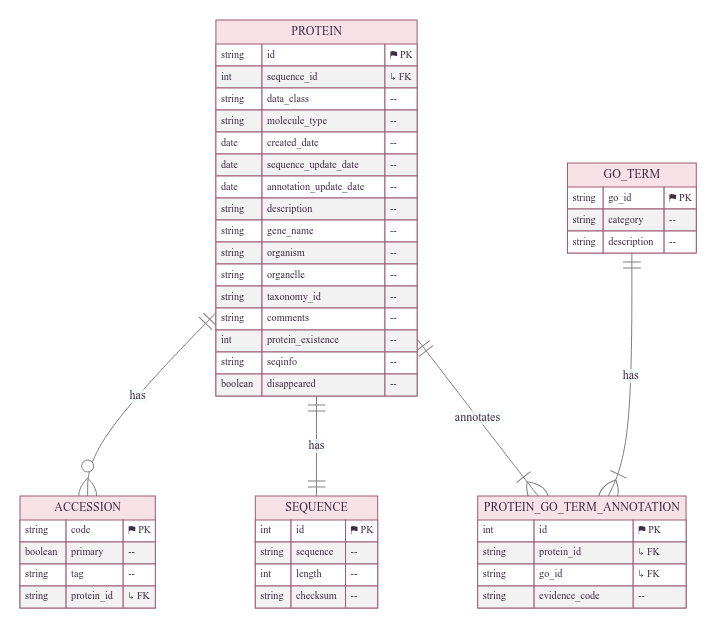
Reference (lookup table): curated embeddings and GO annotations generated in the Protein Information System (PIS) at CBBIO [1], a structured information system designed for large-scale functional annotation and protein-related analyses.
Reference Datasets
Two packaged reference datasets are available; select one depending on your analysis needs:
Main Reference (last layer, default) Embeddings extracted only from the final hidden layer of each PLM. Recommended for most annotation tasks (smaller, faster to load). Config URL: https://zenodo.org/records/17167843/files/FANTASIA_UniProt_Sep2025_Last_ExpOnly.dump?download=1
Multilayer Reference (intermediate + final layers) Embeddings extracted from multiple hidden layers (including intermediate and final). Suitable for comparative and exploratory analyses requiring layer-wise representations. Config URL: https://zenodo.org/records/17151847/files/FANTASIA_UniProt_Sep2025_Final+Interm_ExpOnly.dump?download=1
Provisioning Reference Data
During initialization, FANTASIA downloads the packaged reference embeddings and loads them into the database used by PIS. This step prepares the lookup tables before running the pipeline.
Initialize FANTASIA environment
Read YAML configuration.
Download the reference embeddings dump (if URL provided).
Ensure base directories exist.
Use --embeddings_url to override the dataset URL from YAML.
options:
  -h, --help            show this help message and exit
  --config CONFIG       Path to the YAML configuration file. Default: './fantasia/config.yaml'.
  --embeddings_url EMBEDDINGS_URL
                        Override the embeddings dump URL (otherwise taken from YAML).
  --base_directory BASE_DIRECTORY
                        Base directory used to place the embeddings/experiments folders.
  --log_path LOG_PATH   Path or directory for logs. If a directory, a 'Logs_<timestamp>.log' file is created inside.
Examples
# Initialize with default from YAML (Final layer only)
fantasia initialize --config ./fantasia/config.yaml

# Explicitly use Final layer only (smaller, faster)
fantasia initialize --config ./fantasia/config.yaml \
  --embeddings_url https://zenodo.org/records/17167843/files/FANTASIA_UniProt_Sep2025_Last_ExpOnly.dump?download=1

# Explicitly use Final + intermediate layers (larger, more detailed)
fantasia initialize --config ./fantasia/config.yaml \
  --embeddings_url https://zenodo.org/records/17151847/files/FANTASIA_UniProt_Sep2025_Final+Interm_ExpOnly.dump?download=1
Query Embeddings (experiment-local)
When running the full pipeline, the embedding stage writes per-layer query
embeddings into a single HDF5 file (embeddings.h5) under the experiment folder, using:
/accession_<ID>/type_<embedding_type_id>/layer_<k>/embedding
Each layer group includes a shape attribute; the accession group may include one
sequence dataset. In lookup-only mode you can point directly to an existing HDF5.
Database-Backed Similarity Search
FANTASIA uses PIS (PostgreSQL + SQLAlchemy ORM) as the authoritative reference source. Before distance computation, the lookup stage materializes per-model reference arrays in memory (IDs + dense vectors) and preloads GO annotations.
Execution flow (layer-aware):
Resolve embedding types: match enabled model keys from the YAML config to types available in PIS (pulling per-model distance_threshold and batch_size).
Build lookup tables in memory: per model, load ids and embeddings (optionally applying taxonomy include/exclude filters).
Iterate query HDF5: for each accession, for each type and each layer_k present under
/accession_*/type_*/layer_*/embedding, enqueue a task (legacy format without layers is also supported).Distance kernels: compute cosine or euclidean distances on GPU (PyTorch) or CPU (SciPy), as configured via use_gpu.
Neighbor selection: if a per-model distance_threshold is set, filter by threshold and then cap to limit_per_entry; otherwise, take the top limit_per_entry nearest neighbors.
Write outputs: store compact RAW per (model, layer, GO). Post-processing computes reliability, scores, and final CSV/TSV artifacts. Results are not written back into PIS.
Configuration notes:
Distance metric is read from:
embedding.distance_metric(euclidean|cosine).Defaults:
limit_per_entry: 5unless overridden.Redundancy (optional): set
redundancy_filter > 0to enable MMseqs2 clustering and exclude same-cluster neighbors during selection.
Configuration Surfaces (DB & Similarity Search only)
Reference provisioning
embeddings_url— URL of the reference lookup dataset
Lookup (similarity search)
embedding.distance_metric—euclidean|cosine(metric used by the lookup stage).limit_per_entry— number of nearest neighbors retained per query (per model/layer).batch_size— lookup processing batch size for distance computation.redundancy_filter/alignment_coverage— optional MMseqs2-based redundancy control.taxonomy_ids_to_exclude/taxonomy_ids_included_exclusively/get_descendants— taxonomy filters.embedding.models.<ModelKey>.distance_threshold— optional per-model cutoff applied before capping tolimit_per_entry.
Database (PIS)
DB_HOST,DB_PORT,DB_NAME,DB_USERNAME,DB_PASSWORD— PostgreSQL connection used by PIS.